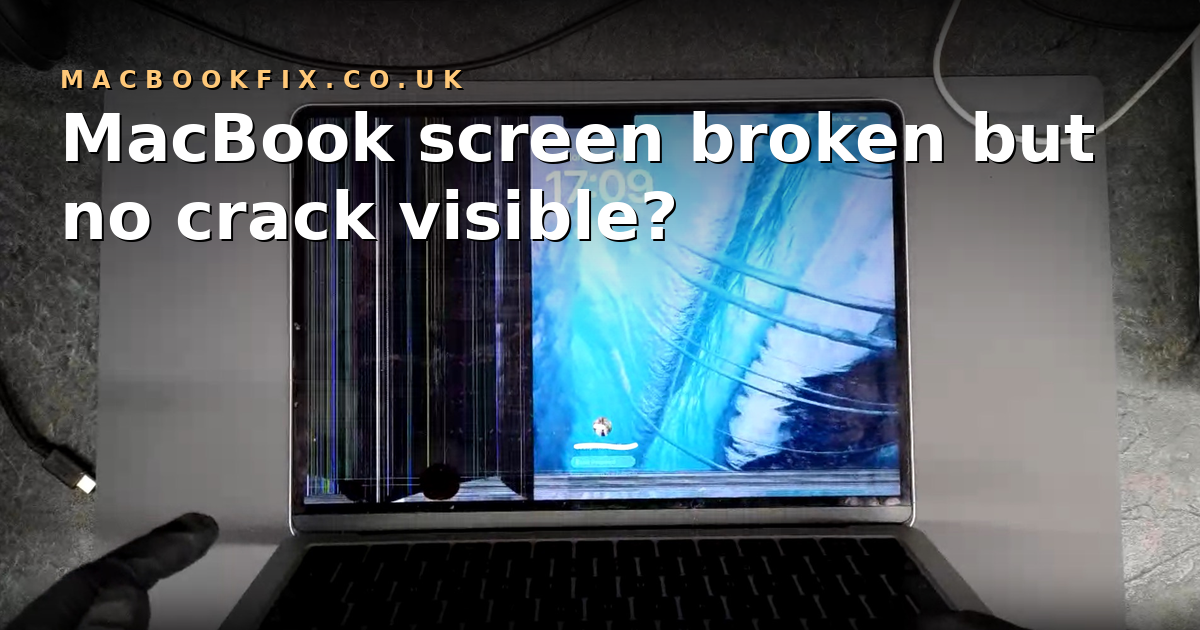
MacBook screen broken but no crack visible? Here's what's actually happened
A plain-English guide to internal LCD damage on a MacBook — the kind that breaks the screen without leaving a mark on the outside.
If your MacBook screen has gone black, started flickering, or sprouted pink lines or ink-blot patches — but the outer surface looks completely fine — the natural reaction is to assume the problem must be something else. A software bug after a macOS update. A loose cable. The logic board. Anything but the screen, because the screen looks fine.
Nine times out of ten, it isn't any of those. The screen is broken — just internally. The LCD layer behind the outer glass has fractured, even with nothing visible on the front. This is more common than most realise: the LCD inside a modern MacBook is thinner than a credit card and sits behind a tougher outer layer that's designed to flex. So when a knock, a pinch in a bag, or a slightly too-firm lid close puts pressure on the screen, the LCD usually gives way first — silently — while the outer layer absorbs the impact and shows no damage at all.
The good news: this kind of damage is repairable, and on most models the fix doesn't require replacing the whole display assembly. This guide walks through how to confirm that's what you're dealing with, why the LCD breaks before the glass does, and what your repair options look like in the UK.
What's actually inside a MacBook screen?
A MacBook display isn't a single sheet of glass — it's a stack of delicate layers bonded together as one assembly. Knowing what's in there helps explain why a screen can fail invisibly.
LCD panel and the outer optical layer
On every modern MacBook, the LCD panel and the outer "glass" layer are permanently laminated together as one ultra-thin unit. They look like one piece, but they behave very differently under stress.
The LCD panel is made from microscopic liquid-crystal cells held between extremely thin glass sheets — often thinner than a credit card. This inner layer is rigid and fragile, and even light pressure or slight flexing can cause it to fracture internally.
The outer layer is tougher. Older Intel Retina models use a thin sheet of cover glass; newer Apple-silicon models (M1, M2, M3, M4, M5) use a laminated optical composite that's less brittle, slightly flexible, and significantly more impact-resistant than the LCD underneath. It can bend a fraction without cracking — which is exactly why the display can look untouched from the front even after the LCD beneath it has shattered.
Backlight and LED illumination
Behind the LCD sit several ultra-thin diffuser sheets and an LED backlight strip running along the bottom of the panel. The LED strip generates the light; the diffuser sheets spread it evenly across the whole screen. A failure here typically shows as a dim or partly-dark display rather than lines or ink patches.
Why the LCD breaks before the outer glass does
When a MacBook is dropped, squeezed in a bag, or pressed on the bezel, the part that usually breaks first is the LCD — not the outer surface. The outer layer is engineered to absorb minor pressure with a slight flex. Instead of cracking instantly, it bends just enough to protect itself.
This is also where MacBook screens behave very differently from iPhone or iPad screens. The top layer on an iPhone or iPad is true cover glass — rigid and brittle, so when it takes a knock you see the crack straight away. A MacBook's outer layer isn't really glass in the same sense. It's a laminated composite that behaves more like a slightly flexible plastic. It can bend just enough to hide the impact, while quietly passing the force to the LCD behind it. The damage is just as real; it simply doesn't show on the surface.
The LCD itself cannot bend. It's ultra-thin, rigid, and extremely delicate. When stress passes through the outer layer, the force is transferred directly to the LCD, which fractures internally while the top surface stays visually perfect.
That's why a customer can bring in a MacBook that looks brand new from the front, only for the technician to find a shattered LCD from the back of the lid. The damage is real, it just isn't on the side the user can see.
Signs your MacBook screen is internally damaged
Internal LCD damage rarely announces itself with a crack. Far more often, you'll see one or more of these symptoms:
- Pink, green, or blue vertical lines running down the screen
- A dark ink-blot patch that spreads gradually over hours or days
- A flickering display that worsens when the lid is opened or closed
- A completely black screen even though the MacBook is clearly powered on (you can hear the fans, the keyboard backlight is on)
- Horizontal bands that change as the lid is flexed
- A bright white or grey screen with no image
A quick at-home test: plug the MacBook into an external monitor.
- If the external monitor shows a clean, normal picture → the logic board is fine and the damage is in the screen only. That's the straightforward repair case.
- If the external monitor shows the same fault → the issue is on the logic board rather than the screen, and you should stop using the MacBook to avoid further damage.
This single test tells a technician most of what they need to know before opening the device.
Can you keep using a MacBook with internal screen damage?
In the short term — yes, especially if an external monitor works. Plenty of people run an affected MacBook as a desktop machine in the meantime.
The catch is that internal LCD damage tends to spread. A small ink-blot patch can grow over a few weeks until the screen is unusable, and continuing to open and close the lid can stress an already-fractured panel further. If you rely on the laptop being portable, the longer you wait, the more likely the fix is "replace the LCD" rather than something cheaper.
Your repair options
Three legitimate routes for a UK customer:
Apple or an Apple Authorised Service Provider. Excellent work, well-warrantied, but priced for a full top-case replacement on most modern models rather than an LCD swap. On a recent MacBook Pro 14- or 16-inch the bill can run into four figures.
An independent shop that replaces the whole display assembly. A common option. Carries some risk depending on the parts source — a genuine OEM assembly costs almost as much as Apple, while non-genuine assemblies are cheaper but vary in quality. Always check reviews and warranty before sending a device.
An independent shop that replaces only the LCD panel. Usually the cheapest legitimate route, because the outer optical layer (which is the expensive part of the assembly) is kept and only the broken inner panel is swapped out. This is the service we specialise in. Done with a high-quality OEM panel and a proper laminating process, the finished result is indistinguishable from a brand-new screen.
All three options are valid — the trade-off is price against where you'd rather get it done.
How much does internal LCD repair cost?
The price depends on the MacBook model and which layer is damaged. Rather than quoting numbers that'll be out of date by next month, we keep live pricing on each model's page — pick your model on our MacBook Pro repair or MacBook Air repair page and the cost for an LCD-only service shows alongside turnaround time.
As a rough guide, an LCD-only repair is typically a fraction of the cost of a full display-assembly replacement, which is itself a fraction of Apple's own service cost on M-series machines.
Frequently asked questions
Why did my MacBook screen break without cracking?
Because the LCD inside the screen is far more fragile than the outer optical layer. When pressure or a slight flex reaches the panel, the LCD fractures while the tougher outer layer flexes and recovers. The result is internal damage that's invisible from the front.
Can a MacBook screen be repaired without replacing the glass?
Yes — on most modern MacBook models the LCD panel can be replaced on its own while the outer optical layer is kept. This is what makes LCD-only repair cheaper than a full display-assembly replacement. The work needs proper lamination equipment, so it's worth checking that whichever shop you choose actually offers LCD-only service rather than only full assemblies.
Is it safe to use a MacBook with a damaged internal screen?
Short-term, yes, particularly with an external monitor. The damage doesn't put the logic board at risk on its own. Be aware that internal LCD cracks tend to spread, and continued lid flexing makes things worse, so the longer you wait the higher the chance the repair gets more involved.
Does Apple replace just the LCD, or the whole top case?
Apple's own service generally replaces the full top case, including the screen and the lid housing, rather than the LCD panel alone. That's one of the main reasons Apple repairs are more expensive than independent LCD-only work on the same fault.
Will I lose my data during a screen repair?
No — a screen repair doesn't touch the SSD or the logic board, so your files, apps, and macOS install stay exactly as they were. We still recommend a Time Machine backup before sending any device for repair, simply because it makes the days you're without the laptop easier.
How long does an LCD-only screen repair take?
Turnaround varies by model and current parts availability — most LCD-only repairs are completed within a few working days from receipt at our workshop. The exact estimate for your model is shown on the model's repair page alongside the price. The how it works page walks through the postage flow if you've not used a mail-in repair service before.
When to get a quote
If your MacBook screen has gone dark, developed lines, or shows ink-blot patches with no obvious damage on the outside, it's almost certainly internal LCD damage — and it's almost certainly fixable. Get a fixed-price quote on your specific model from our MacBook Pro repair or MacBook Air repair page, or send us a message if you're unsure which model you have. All our work is covered by a 12-month warranty and our No Fix, No Fee policy, so if we can't repair it the device comes straight back to you, free of charge.